
Scope of Project: A custom metrics database was created for a department within a corporation. The QA records needed to calculate the team and employee metrics were not used beyond the metrics function and goals. The current process was to record the QA on paper and then entering the details into the Echo database and route the paper files to the main office. The manager was then required to review each paper QA form and eventually extract the data from Echo in a .csv file then create an Excel spreadsheet for each QA. It was a long process taking weeks at a time, and it was not user-friendly. The metrics database solved the problem of the manager’s review and automated the metrics report, replacing the need to create spreadsheets for each QA. However, the .csv file was still necessary to populate the Access database because the QA supervisor’s manual process had not changed.

Problem: The main records/filed for the metrics database needed to be imported from a .csv file pulled from the enterprise, Echo database because access could not be granted to link the tables. As some of the data types in the Echo database did not play well with Office applications, the file required extensive formatting before import to Access. Additionally, the .csv file had to be regularly exported and formatted and the metrics database updated with the new records. Furthermore, the imported records were being recorded on a paper QA form before being entered in the Echo database causing duplication in the process and use of a copious amount of paper which then needed to be printed adding to paper and printing cost.
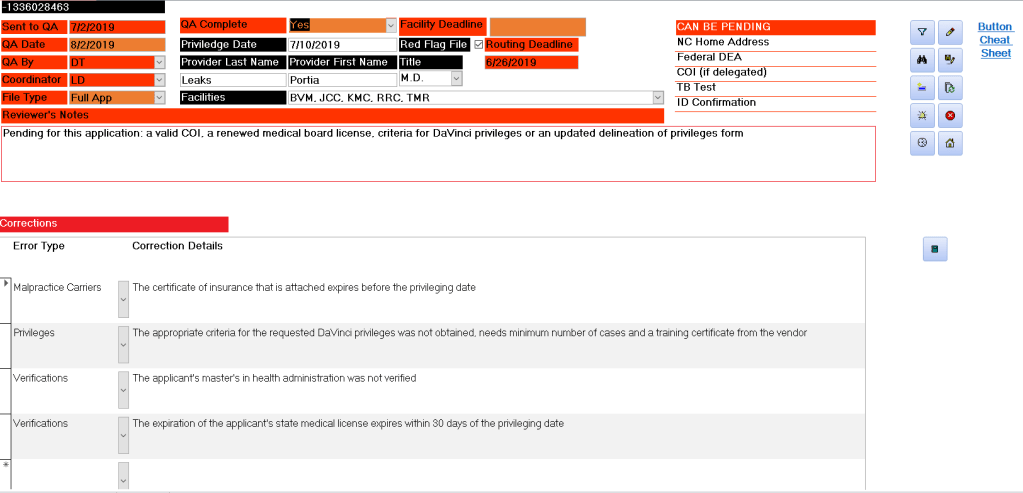
Solution: I replaced the hand-written QA’s with electronic records. Eliminating the paper process (saving on paper and printing costs) and making the QA available instantly, easily retrievable, and searchable. I also automated the error counts and categories for each QA. I linked the electronic QA records to the Metrics Database application, which greatly reduced the timeframe that the manager could review the files and the metrics for each coordinator. A smart dashboard displays the pending files to be QA’d, flags files with issues in the daily messages and offers automated queries and reports.

This automation not only promotes best practices among credentialing specialists but also improves overall quality and efficiency, ensuring higher standards in our healthcare system.
 K Henry Microsoft Access Database Developer